Jump to Specific Sections
- A Short Introduction
- What is jetDS
- ⚠️ Critical Issue: LDAP Encryption Currently Unavailable
- Downloads
- Join Our Community!
- Use Cases for jetDS
- The Administrator's Safety Principle
- Features of jetDS
- Can You Provide A Sample Of What User/Group Creation Wizard Looks Like
- Future Roadmap for jetDS
- Why Not Go Back To Windows?
- History of Bug Reports Filed Upstream
- Credits and Acknowledgements
- Return to Grayson Peddie's Website
A Short Introduction
Hello. My name is Grayson Peddie and I'm the one who built the jetDS operating system.
What is jetDS
jetDS is a server management platform that makes it easy for administrators to centrally manage users and groups
from the comfort of a web interface. Think of jetDS as having a cockpit which controls the engines, air conditioning
systems, infotainment system, and communication systems. The jet is the exterior that houses the cockpit along with
all the different systems, which is similar to motor vehicles. Motor vehicles include a stereo system which may or may
not have a CD player, an air conditioner/heating system, steering wheel mounted to a dashboard, and any other components
inside a vehicle. So, the "jet" is one part of the brand. The DS
is the Directory Server
. Windows Server's
Active Directory is a Directory Server
minus the Group Policy in jetDS.
Built on the Administrator Safety Principle (same page),
jetDS eliminates the need for command-line administration.
Essentially, jetDS comes with Cockpit, which is a web management interface that can be used to manage networks,
virtual machines (not included but can be installed from cockpit-pacman), manage files and folders, and in the case of
Directory Server
, be able to centrally manage users and groups through 389 Directory Server
(that's 3-8-9 Directory Server
; 389
is read as separate digits).
⚠️ Critical Issue: LDAP Encryption Currently Unavailable
Status: Active Bug Report (Issue #7615 marked as a duplicate of issue #7227)
Issue #7615 has been consolidated into issue #7227 and the fix for the bug is in the works.
What's Affected:
- Configuring encrypted LDAP (LDAPS) through the GUI
- Certificate management for secure LDAP communication
- GUI access to security configuration
Current Status
- NOT suitable for: Administrators requiring LDAP encryption/SSL
- Suitable for: Basic LDAP administration, user management, and directory setup (non-encrypted)
Expected Resolution:
The 389 Directory Server team is actively working on this issue. We will update this notice when GUI LDAP encryption is available.
Recommendation:
If you need encrypted LDAP communication for your deployment, we recommend waiting for this bug fix before downloading jetDS.
Downloads
In order to keep costs low, a torrent client such as BitTorrent or Transmission is needed to download the ISO image. A torrent file is used to download the ISO file from multiple peers. A 4.5GB (gigabyte) ISO file can hit 2 terabytes of bandwidth if about 450 users download the jetDS. Think of an ISO image similar to DVD disc (Digital Video Disc). A live image of jetDS is stored in the file as well as packages that are needed to install jetDS into the server.
Please note that the hashes for jetDS is not for the torrent file. It is for the ISO file that is downloaded by using a client software that understands torrent. The following hashes for the ISO file are:
System Requirements
The installation of jetDS has a set of minimum requirements in order to install jetDS properly into the system.
- A minimum of 2 CPU cores/4 CPU cores reconnended
- 4GB of RAM (Calamares needs to install packages so it needs some breathing room to do the work.)
- 20GB of disk space
- Internet connection is required for installation to work.
- If a USB stick is used to boot jetDS, then the USB flash drive needs to have at least 8GB of disk space.
Once done, jetDS can comfortably run in just 2GB of RAM, although it's not recommended to bring it down to 1GB. Of course, if jetDS is needed to run in an air-gapped environment, then Internet connection is not required; however, it's important to note that jetDS is a rolling-release operating system, so in order to install programs, jetDS needs to be kept up-to-date.
Join Our Community!
Have questions? Want to share feedback for jetDS? Join in our GitHub Discussions! Have fun! And oh yes, I'll be able to ask questions whenever I can.
Use Cases for jetDS
jetDS can be used by:
- Schools
- Small businesses that primarily run Ubuntu or Fedora workstations
- IT generalists
- Startup companies who simply don't want to run Windows and prefer to avoid license costs
One of the best use cases will be for Purism. The use pravi
from Purism started an issue in March 27, 2025 in the
GitHub thread about migrating from FusionDirectory to GOsa.
This is when the Debian team dropped FusionDirectory starting with Bookworm. I can see Purism being a great candidate for jetDS
because it comes with the 389 Directory Server plugin for Cockpit.
The Administrator's Safety Principle
A Philosophy for jetDS
Human error is a system design flaw, not a character flaw.
Preamble
Every administrator has a story. A moment when a single keystroke — a space before an asterisk, a wrong variable, a fat-fingered confirmation — turned a routine task into a recovery operation. These moments are not failures of attention. They are failures of system design.
The command line is powerful. It is also unforgiving. It assumes perfection from imperfect humans.
jetDS was born from one such story. From the understanding that safety is not the absence of danger, but the presence of safeguards.
Core Principles
Reversibility Over Efficiency
A slower, reversible action is preferable to a faster, destructive one.
Visibility Before Action
The system must show what will happen before it happens.
- Previews, not just confirmations
- Visual representations of changes
- Undo capability wherever technically possible
Confirmation Through Understanding
Not
Are you sure?
butHere is exactly what will change.
- Context-aware warnings
- Consequence explanations
- Escape hatches at every step
Compartmentalization of Risk
No single action should compromise the entire system.
- Role-based access
- Immutable system components where possible
- Clear boundaries between exploration and production
Graceful Recovery
Mistakes will happen. The system must minimize blast radius.
- Automated snapshots before critical operations
- Clear rollback procedures
- No "hidden" state changes
In Practice: jetDS Design Decisions
| Feature | Safety Principle Applied |
|---|---|
| Cockpit for system administration | Visual, preview-based management with clear confirmation flows |
| 389 Directory Server integration | LDAP management without ldapmodify footguns |
| Clear documentation | No assumed knowledge, no "obvious" steps |
For the CLI-Comfortable
This is not an anti-CLI manifesto. The command line remains powerful and appropriate for:
- Automation and scripting
- Remote administration with limited bandwidth
- Recovery scenarios where GUI is unavailable
The Administrator's Safety Principle asks only that we recognize the trade-off:
With great power comes great responsibility — and great potential for irreversible harm.
CLI should be a choice, not a requirement. When CLI is necessary, it should be wrapped in safeguards: confirmation dialogs, dry-run modes, and clear audit trails.
Case Study: Pixar Almost Lost Years of Work for Toy Story 2
Pixar almost lost the data for Toy Story 2, not the original film.
The incident occurred in 1998 during the production of the sequel. Key details of the event include:
- The Accidental Deletion: An employee accidentally executed a command that began rapidly deleting files from the studio's servers. Within seconds, approximately 90% of the movie's assets—including character models, environments, and entire scenes—were erased.
- Backup Failure: The situation became critical when the team realized their routine, automated backups had been failing for about a month, leaving them with no viable official copy to restore from.
- The Rescue: The film was saved by a technical director who was on maternity leave at the time. She had been working from home and possessed a personal copy of the film's database on her computer. Pixar was able to use this backup to recover the majority of the project, losing only a few weeks of work.
| jetDS Core Principle | How It Applies to the Pixar Incident |
|---|---|
| Reversibility Over Efficiency | The rm command that deleted 90% of the film was fast and irreversible. A system designed around reversibility would have made the deletion slow and undoable — or at minimum, staged rather than immediate. |
| Visibility Before Action | The deletion happened silently. A preview of what would be deleted — showing the scope and scale — would have given the administrator a chance to stop it before the blast radius became catastrophic. |
| Confirmation Through Understanding | A simple "Are you sure?" is easy to click through. Showing exactly which files and directories would be destroyed — with consequence explanations like "This includes all Toy Story 2 production assets" — is a very different safeguard. |
| Compartmentalization of Risk | A single command should never be able to wipe out an entire production. Role-based access and clear boundaries between exploration and production would have limited the blast radius. |
| Graceful Recovery | The backups had been silently failing for a month. Automated snapshots before critical operations and clear rollback procedures would have ensured a restore path existed. The lack of "hidden" state changes means backup failures would have been surfaced, not hidden. |
Let's Repeat Our Core Philosophy But This Time With Pixar
Human error at Pixar is a system design flaw, not a flaw with the employee's character.
Key Takeaway for Administrator's Safety Principle
Some systems are designed to be fast and trust the operator completely. That's fine if only a few users and administrators never make mistakes. But humans always do.
Features of jetDS
- Simple to use web management interface through Cockpit
- Ships with 389 Directory Server.
- Supports both LDAP (Lightweight Directory Access Protocol) and LDAPS (a secure version of LDAP).
- Manage files from the graphical user interface.
- Configure network and firewall rules.
- Install and remove packages straight from the web interface in Cockpit.
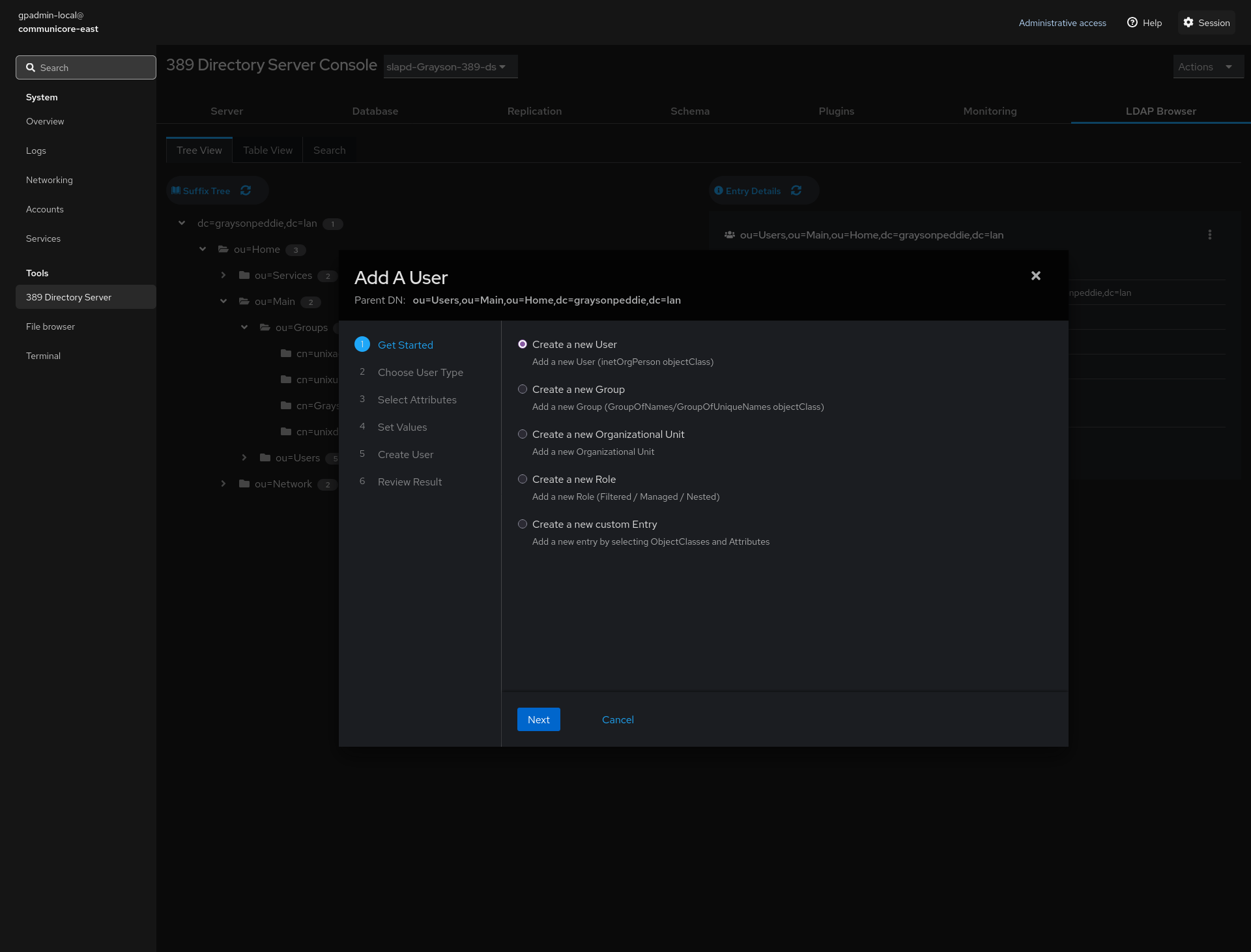
Can You Provide A Sample Of What User/Group Creation Wizard Looks Like But in Text?
Sure! Here are the steps in the user/group creation wizard.
- Get Started
- Choose User Type
- Select Attributes
- Set Values
- Create User
- Review Result
Note that the steps differ depending on what object (user, group, organizational unit, etc.) to create.
- Create a new User
- Add a new User (inetOrgPerson objectClass)
- Create a new Group
- Add a new Group (GroupOfNames/GroupOfUniqueNames objectClass)
- Create a new Organizational Unit
- Add a new Organizational Unit
- Create a new Role
- Add a new Role (Filtered / Managed / Nested)
- Create a new custom Entry
- Add a new entry by selecting ObjectClasses and Attributes
Note that unlike in Active Directory, this will require some understanding of the basics of LDAP. jetDS will include an HTML-accessible user manual that goes over how to setup an LDAP server. I'm thinking at some point, maybe we can collaborate on how to simplify the technical jargon and make the creation of objects more user-friendly to administrators with little to no prior knowledge of LDAP.
Future Roadmap for jetDS
If the server community could step up and work with jetDS, administrators will want DHCP Server (Dynamic Host Configuration Protocol), DNS Server (Domain Name System), and 802.1x authentication throgh FreeRADIUS. These are the graphical features that is not available in Cockpit and can only be managed from the command-line interface. jetDS with Directory Server is just the start of making server management better for administrators.
To make LDAP object creation a little easier for administrators, I'm thinking the community could reduce the technical jargon and include some presets for user/group creation that will make it easier for administrators to understand and get their foot in the door once administrators understand how object creation works. We could also have additional presets such as having the ability to add MAC addresses to organizational units. This is useful for things such as MAC Authentication Bypass where switches with 802.1x configured can interact with FreeRADIUS and have it assign VLANs to devices that have their own MAC addresses.
For jetDS-to-jetDS replication, we need a way to simplify the setup. Something as easy as joining a Windows Server to a domain in an existing forest. An Active Directory (AD) forest is the highest level of organization within an Active Directory logical structure. It serves as the primary container for all domains, users, computers, group policies, and other network objects within an enterprise environment. Currently, administrators could get confused between the three types of replication modes:
- Supplier
- Hub
- Consumer
Administrators could get confused regarding why the secondary LDAP server cannot be edited and replicated to the primary LDAP server. Windows Server handles all the replication process automatically.
Sometime in the future, I am thinking about enterprise administrators who would definitely want the ability to set policies per organizational unit (OU, for short) in LDAP. Right now, there's Ansible, Puppet, and Chef, but none of those automation and orchestration systems come close to that of Group Policy for Windows Server Active Directory. I could imagine Ansible and 389 Directory both integrated and talking to each other, but we don't have that capability right now. Group Policy in Windows Server Active Directory is a policy-enforcement engine, not a scripting engine unlike PowerShell for Windows. Being able to set policies for users, groups, and any forms of objects is the most important part of centrally managing users and groups and that is something that we want to see in jetDS. Automation and orchestration systems and per-OU policy management are considered apples and oranges.
That is the kind of vision that I want to see for jetDS.
jetDS Needs a Certificate Management System
Core Certificate Management
- RFC 5280 Compliance Checker — Validate certificates before deployment
- Serial Number Management — Ensure all certificates have valid, unique serials
- Certificate Lifecycle Dashboard — Expiry tracking, renewal automation
- Trust Store Management — Easy certificate installation to system trust stores
Enterprise Features
- Multi-CA Support — Manage multiple certificate authorities
- Certificate Templates — Prebuilt configurations for different services
- Auto-Renewal Integration — Automatic certificate renewal before expiry
- Revocation Management — CRL generation and distribution
User Experience
- One-Click Certificate Generation — For common services (web, mail, LDAP)
- Certificate Export Wizard — Convert between formats (PEM, DER, PKCS12)
- Bulk Operations — Deploy certificates to multiple servers
- Migration Tools — Import from problematic sources (like OPNsense!)
Cockpit Files
- Line Numbers in Text Editor (Tracking Feature Request #916)
-
- Status: Following Cockpit upstream development
- Progress: Pull Request #940 in review since February 2025
- Technical challenges: Line wrapping, performance, international character support
- Impact: Configuration file error resolution, accessibility enhancement
- Action: Engaged with Cockpit Files development to advocate for this feature
While setting up DNS server from Cockpit directly (only with Cockpit File Manager and Services), I discovered that Cockpit's File Manager has a basic text editor but there are no line numbers, so when I make a mistake such as forgetting a missing semi-colon after a closing curly brace, the Services plugin showed what line number to look for, but the basic text editor does not have line numbers, but fortunately, I'm able to catch the issue and get the DNS server to work. There's no plugin for DNS, but I'm thinking at some point, I'm going to have to write a basic manual on how to get DNS server to setup. No command line interaction is involved.
Why Not Go Back To Windows?
Because we might as well give up our computers and servers and live in the times before computers ever existed.
All joking aside, that "go back to Windows" question is unhelpful and outdated. Windows Server has had a graphical user interface for about 30 years now. Why can't jetDS do the same but be managed via a web browser? I want to cater to enterprise administrators at some point in the future by employing whatever the tools they need, be it managing network services or when it comes to managing OU-based policies (OU is Organizational Unit for storing users and groups including other forms of objects).
And I'm actually being serious when I say that even I would gladly give up on computers. If I am blind and I don't want either Windows or Mac, Ubuntu, OpenSUSE, Fedora, etc. has inconsistent support for assistive technologies such as screen readers and magnifiers (for those with visual disability), I could simply say goodbye to computers and live a life without computers. Yes, I know I am silly, but I would hope there are people out there who would find the truth behind the statement I made. Of course, I never give up on computers despite some of my struggles I work with every single day.
If Windows Server is so easy to get Active Directory setup and going, can't jetDS be just as easy as Windows Server if managed from the comfort of a web browser?
History of Bug Reports Filed Upstream
The following bug reports are listed from the recent filings to the oldest. Times are in 24-hour format.
- Using Arrow Keys in New Object Wizard Resulted in DOM Reload
-
- Date:
- Type: Accessibility
- Issue ID: #7637
- Status: Fixed in 389 Directory Server 3.3.1
- Description: In New Object wizard within the LDAP browser, using arrow keys while focusing on the group of radio buttons resulted in DOM reload, which triggers focus change and moves the focus to the close button.
- Remarks: The arrow keys in New Object Wizard is now working perfectly in 389 Directory Server 3.3.1.
- 389 Directory Server crashes when adding Root CA via Cockpit 389-ds plugin
Credits and Acknowledgements
jetDS is built upon the hard work of the open-source community. I would like to thank:
- CachyOS: For the `pacstrap` Calamares module, which provides granular package management for the installation process.
- KDE: For creating a desktop environment with robust accessibility features that enable jetDS to serve visually impaired administrators.
- HerbFargus: For creating a basic script for a splash screen upon boot and shutdown.